Civinfo

12.jpg

Help Rules Search Stickers Surveys Wiki Forum
Go Back   Civinfo > 8th Generation Euro Honda Civic > How To

Reply
 
LinkBack (2) Thread Tools
Old 26th July 2007, 22:45   2 links from elsewhere to this Post. Click to view. #1 (permalink)
Supporter
 
ante00's Avatar
 
 
Car: 2007 1.8 Sport MT (Vivid)
Join Date: 18th April 2007
Location: Zagreb, Croatia HR
Posts: 828
Thanks: 16
Thanked 44 Times in 43 Posts
iTrader: (0)
Eco display
Ambient Lighting Easy Install (dimming)

Here is a guide (how to) install ambient lights in simply way and they dimm when you open door (like lights for reading....)
.....c/p from some german forum....and sorry for bad translation in file....but you'll get the idea just by looking in pictures.....
-------------------------------------------------------------------------------------------------------------------------------
-------------------------------------------------------------------------------------------------------------------------------

Ambient lighting (dimming)

The simplest method is to measure the whole thing over interior lighting. Work time approx.. 1 hour.

Advantage:
· functionality remains preserved (automatic Dimmen etc..)
· simple to install

Material:
· 2 x LED borders (over eBay)
· cables not to load small screws
· drill press
· soldering irons
· 2 x connecting terminals (of Conrad)

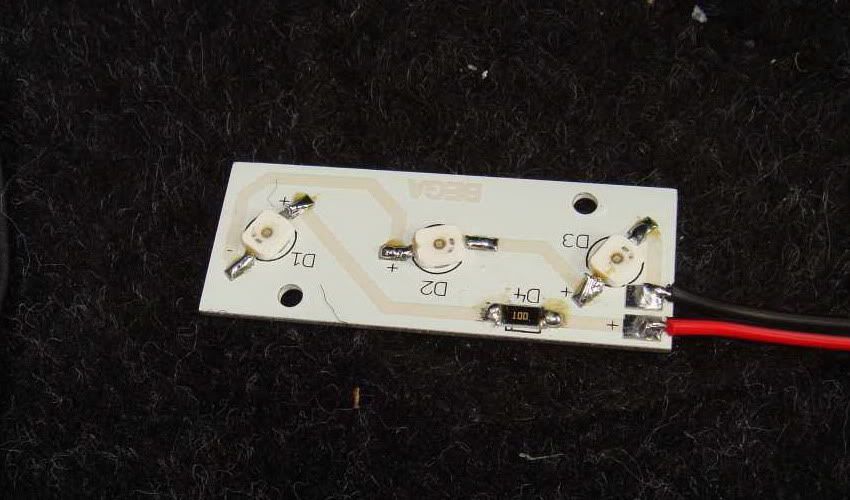
Around the entire electric circuit I decided for such LEDS. There are 3 superflux LED's on board and are shown on supplied metal plate (with eBay approx.. 12€ the piece).
Click the image to open in full size.

Advantage:
· opposite cold light tubes the electric circuit will load hardly and the power inputs is a joke
· super flat and simple to screw under the instrument panel
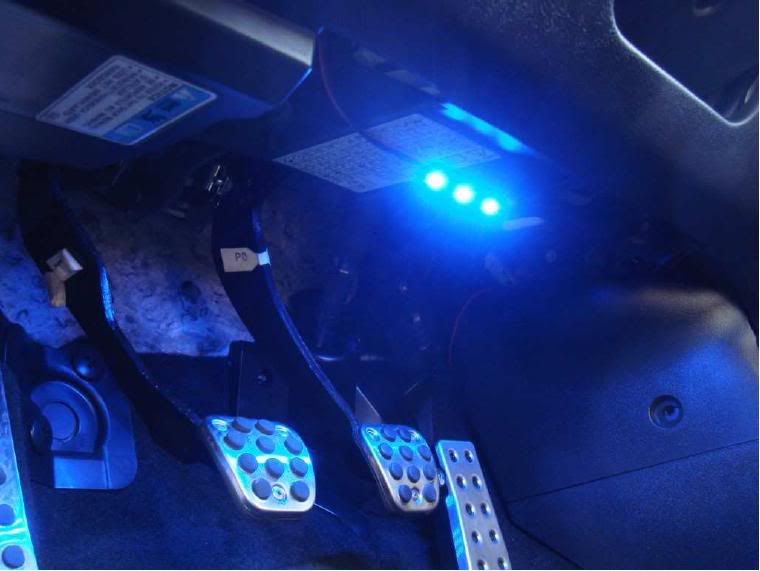
· super brightly and above all also daylight-suited!

On Daylight
Click the image to open in full size.

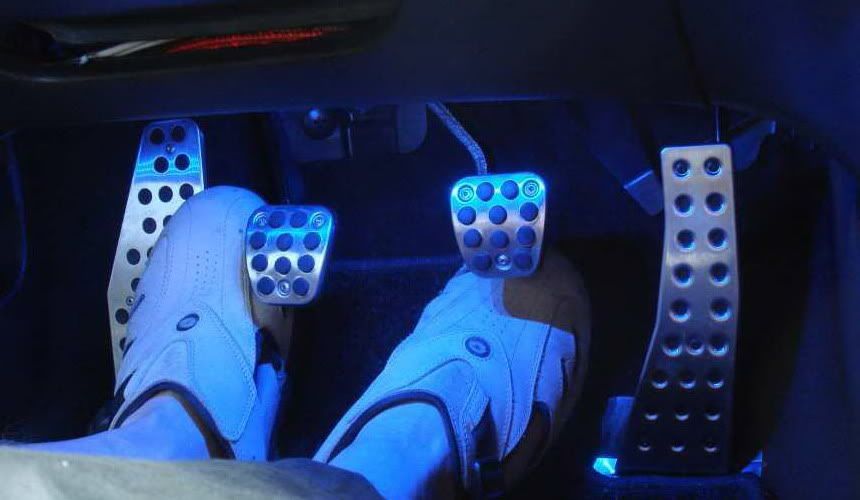
Night
Click the image to open in full size.

And wires:
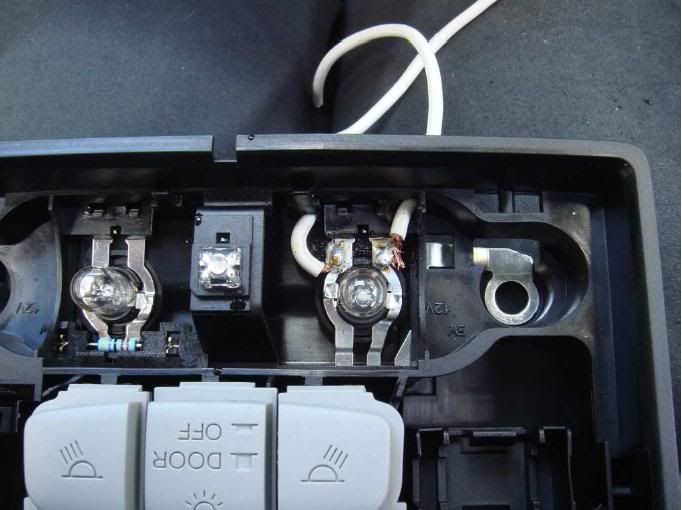
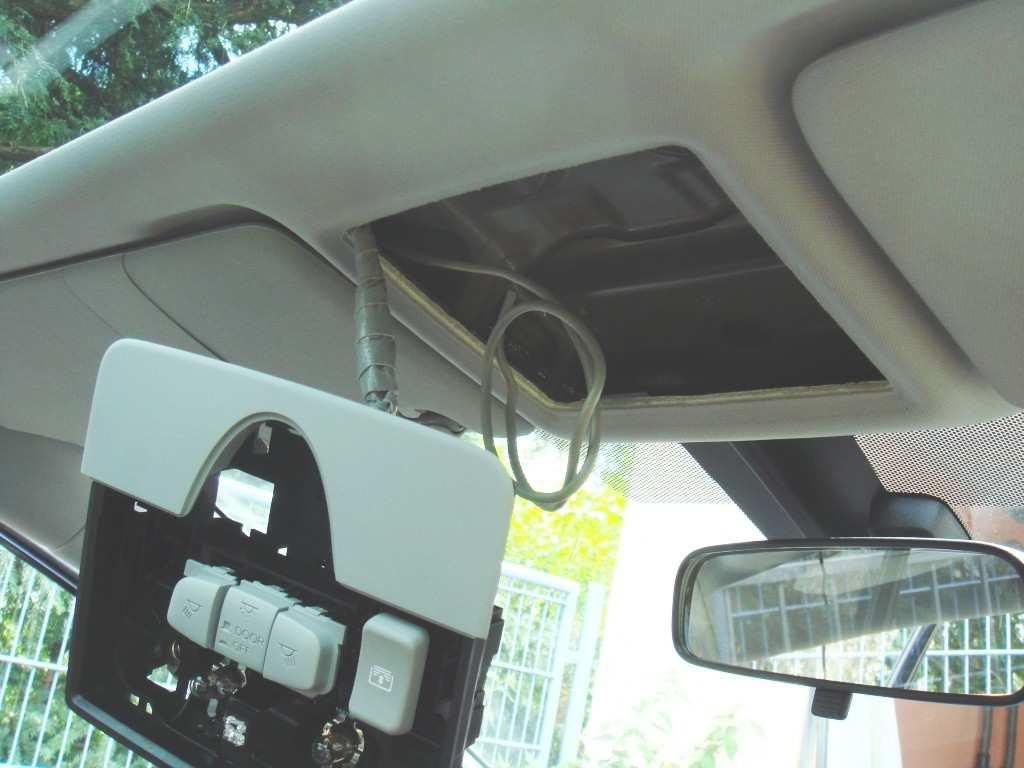
· glass of the interior lighting with small screwdriver lever off (with me a fingernail is already already enough). The whole part has only 2 screws and cables to take off. You have to drill two holes on clean-bored for the additional cable. The positive cable is to the center (red arrrow)

Click the image to open in full size.


Click the image to open in full size.

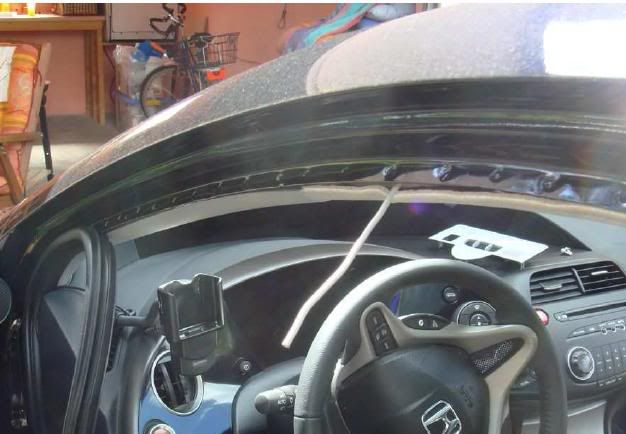
· under the rubber where the firm wire cable is pulled from the door seal of the driver's side (picture below). It can be shifted under the door seal further invisibly up to the instrument panel. The door seal (rubber) can be taken off completely easily and takes no damage thereby

Click the image to open in full size.

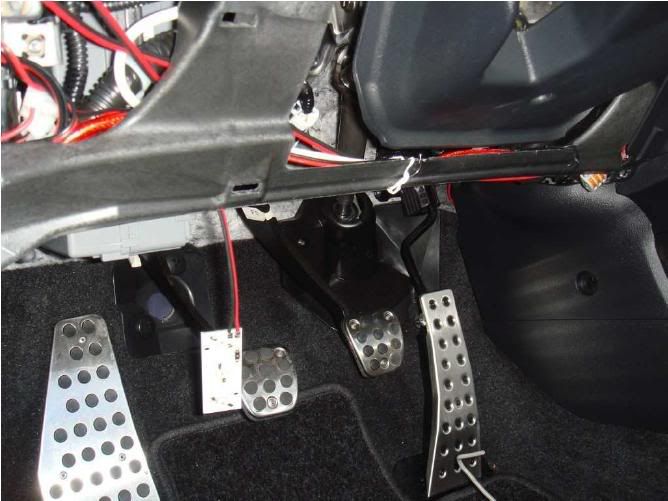
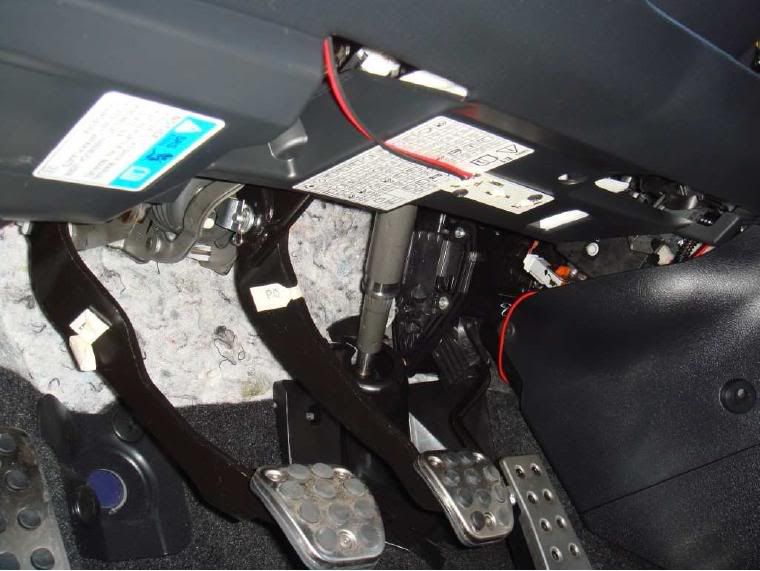
· the side screen of the instrument panel at the driver's side carefully take down with screwdriver. Under instrument panel cover they are fixed with a screw (LED's). Otherwise you could only put them or glue them for simple taking off. Cable is pulled into the instrument panel.
· for the front passenger side has the cable. On the LED soldered with the wire behind the center console to driver's side. The length is sufficient. Both LEDS attached and under the instrument panel bolts.

Click the image to open in full size.

Click the image to open in full size.

Click the image to open in full size.

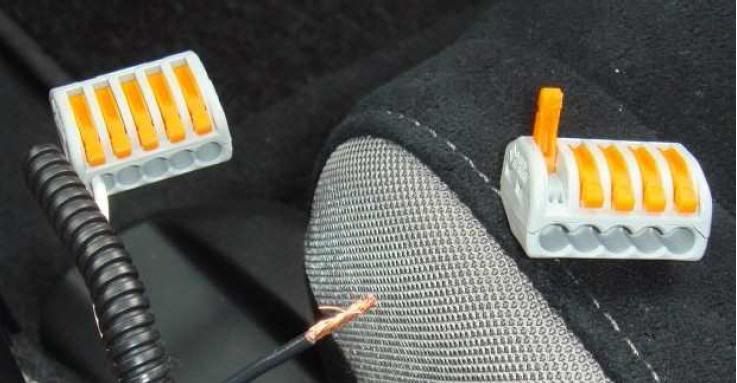
For attaching other side use interwiring clamps, since one doesn't have to solder or screw and later I can still parallel attach it.

Click the image to open in full size.

Last edited by ante00; 26th July 2007 at 23:02.
ante00 is offline   Reply With Quote
Old 27th July 2007, 12:21   #2 (permalink)
 
d-str's Avatar
 
Join Date: 4th February 2007
Location: Latvia, Riga
Posts: 8
Thanks: 0
Thanked 0 Times in 0 Posts
iTrader: (0)
phone holder

can you give me name or link of that phone holder manufacturer web? looks nice.
d-str is offline   Reply With Quote
Old 27th July 2007, 12:25   #3 (permalink)
Supporter
** Thread starter **
 
ante00's Avatar
 
 
Car: 2007 1.8 Sport MT (Vivid)
Join Date: 18th April 2007
Location: Zagreb, Croatia HR
Posts: 828
Thanks: 16
Thanked 44 Times in 43 Posts
iTrader: (0)
Eco display
I don't know it but I think that is serial phone holder for PDA phones (usually comes one with the phone)
ante00 is offline   Reply With Quote
Old 8th August 2007, 23:28   #4 (permalink)
 
Stefce's Avatar
 
Join Date: 19th February 2007
Location: Macedonia
Posts: 10
Thanks: 0
Thanked 0 Times in 0 Posts
iTrader: (0)
There is an easier way to do it by buing a Cold catode computer neon light colored blue and taking some power from the glove compartment and it al works fine,
And by the way i dont like that much blue light at the feet and the way to dim the neons is to cover part of them with black electronic tape and see how much light fits your eyes...
the neons are quite cheap,maybe 10$ max for 2 at yor local computer shop,no heat and low power consumption...and you get wide angle of blue lighting and not spot like Leds....
will share pictures of my setup if needed.
Cheers.
Stefce is offline   Reply With Quote
Old 18th December 2007, 11:55   #5 (permalink)
 
 
Join Date: 15th December 2007
Location: London, UK ENGLAND
Posts: 33
Thanks: 0
Thanked 0 Times in 0 Posts
iTrader: (0)
I wish to have ambient footwell lighting that only comes on when the interior lights are on. Which makes the install alot more straightforward.
Do i really need to pull the power from the Interior lights in the roof? Surely the official Honda kit is not that painful? The earth cable that detects when the doors are open must originate from under the dash to begin with?. Has anyone got the official kit & is able to tell me where & what colour this cable is.
Thoughts please.
FN2 Type R is offline   Reply With Quote
Old 18th December 2007, 12:04   #6 (permalink)
Bog
Supporter
 
Bog's Avatar
 
 
Join Date: 5th October 2006
Location: Romford, Essex GB
Posts: 939
Thanks: 0
Thanked 9 Times in 8 Posts
iTrader: (0)
This thread my help you.... How to Make your own floorlights

A this may help with the wiring.... Install Homing Lights
Bog is online now   Reply With Quote
Old 9th March 2010, 23:38   #7 (permalink)
Supporter
** Thread starter **
 
ante00's Avatar
 
 
Car: 2007 1.8 Sport MT (Vivid)
Join Date: 18th April 2007
Location: Zagreb, Croatia HR
Posts: 828
Thanks: 16
Thanked 44 Times in 43 Posts
iTrader: (0)
Eco display
Uploaded images to other server which some don't work ok.... thx to jont122

Quote:
Ambient Lighting Easy Install (dimming)
Here is a guide (how to) install ambient lights in simply way and they dimm when you open door (like lights for reading....)
.....c/p from some german forum....and sorry for bad translation in file....but you'll get the idea just by looking in pictures.....
-------------------------------------------------------------------------------------------------------------------------------
-------------------------------------------------------------------------------------------------------------------------------

Ambient lighting (dimming)

The simplest method is to measure the whole thing over interior lighting. Work time approx.. 1 hour.

Advantage:
· functionality remains preserved (automatic Dimmen etc..)
· simple to install

Material:
· 2 x LED borders (over eBay)
· cables not to load small screws
· drill press
· soldering irons
· 2 x connecting terminals (of Conrad)

Around the entire electric circuit I decided for such LEDS. There are 3 superflux LED's on board and are shown on supplied metal plate (with eBay approx.. 12€ the piece).
Click the image to open in full size.

Advantage:

· opposite cold light tubes the electric circuit will load hardly and the power inputs is a joke
· super flat and simple to screw under the instrument panel
· super brightly and above all also daylight-suited!

On Daylight
Click the image to open in full size.

Night
Click the image to open in full size.

And wires:
· glass of the interior lighting with small screwdriver lever off (with me a fingernail is already already enough). The whole part has only 2 screws and cables to take off. You have to drill two holes on clean-bored for the additional cable. The positive cable is to the center (red arrrow)

Click the image to open in full size.

Click the image to open in full size.

· under the rubber where the firm wire cable is pulled from the door seal of the driver's side (picture below). It can be shifted under the door seal further invisibly up to the instrument panel. The door seal (rubber) can be taken off completely easily and takes no damage thereby

Click the image to open in full size.

· the side screen of the instrument panel at the driver's side carefully take down with screwdriver. Under instrument panel cover they are fixed with a screw (LED's). Otherwise you could only put them or glue them for simple taking off. Cable is pulled into the instrument panel.
· for the front passenger side has the cable. On the LED soldered with the wire behind the center console to driver's side. The length is sufficient. Both LEDS attached and under the instrument panel bolts.

Click the image to open in full size.

Click the image to open in full size.

Click the image to open in full size.

For attaching other side use interwiring clamps, since one doesn't have to solder or screw and later I can still parallel attach it.

Click the image to open in full size.
ante00 is offline   Reply With Quote
Old 10th March 2010, 17:23   #8 (permalink)
Supporter
 
RickHondaR's Avatar
 
 
Car: Auris T180 was Cosmic EP3
Join Date: 16th August 2008
Location: Mansfield ENGLAND
Posts: 1,635
Thanks: 185
Thanked 95 Times in 85 Posts
iTrader: (42)
This method is a lot easier and quicker to install http://www.civinfo.com/forum/a/32792...s-dimming.html good guide this still is
RickHondaR is offline   Reply With Quote
Old 11th March 2010, 18:56   #9 (permalink)
Supporter
 
DirtyDuds's Avatar
 
 
Car: 2.2 CTDI, Tornado Silver
Join Date: 7th February 2010
Location: Manchester ENGLAND
Posts: 63
Thanks: 7
Thanked 6 Times in 6 Posts
iTrader: (1)
Gotta agree this http://www.civinfo.com/forum/a/32792...s-dimming.html is much easier, that way makes me want to cry
DirtyDuds is offline   Reply With Quote
Old 27th March 2010, 22:35   #10 (permalink)
 
DervMan's Avatar
 
 
Car: 2006 2.2 5 door Milano Red
Join Date: 7th May 2009
Location: Bristol, UK ENGLAND
Posts: 72
Thanks: 5
Thanked 2 Times in 2 Posts
iTrader: (0)
Hey ante00,

Where did you get those electrical connectors, they look really good?
DervMan is offline   Reply With Quote
Reply

  Civinfo > 8th Generation Euro Honda Civic > How To

Thread Tools

Posting Rules
You may not post new threads
You may not post replies
You may not post attachments
You may not edit your posts

BB code is On
Smilies are On
[IMG] code is On
HTML code is Off
Trackbacks are Off
Pingbacks are Off
Refbacks are On


LinkBacks (?)
LinkBack to this Thread: http://www.civinfo.com/forum/how/7174-ambient-lighting-easy-install.html
Posted By For Type Date
Odkazy | Honda CIVIC 8. generace This thread Refback 10th May 2008 22:34
podsvietenie interieru | Honda CIVIC 8. generace This thread Refback 9th May 2008 10:58

Similar Threads for: Ambient Lighting Easy Install
Thread Thread Starter Forum Replies Last Post
Install Ambient Blue Lighting (Switched on by Main Lights) tamar How To 40 22nd July 2009 10:15
Interior Ambient Lighting Griffyn Lights 34 6th January 2008 20:40
Interior Ambient lighting bonzo Lights 5 9th November 2007 13:06
Other Ambient lighting. czechplastik Electronics 9 9th September 2007 12:00
Interior Ambient Lighting Kit Milano_Jon Lights 18 28th August 2007 23:57


All times are GMT +1. The time now is 14:11.


Powered by vBulletin®
Copyright ©2000 - 2010, Jelsoft Enterprises Ltd.
Search Engine Friendly URLs by vBSEO 3.3.2
vB.Sponsors
Site owned by Andrew Potts - nothing to do with Honda!

Hosting by Vidahost One of the largest message boards on the web !

1 2 3 4 5 6 7 8 9 10 11 12 13 14 15 16 17 18 19 20 21 22 23 24 25 26 27 28 29 30 31 32 33 34 35 36 37 38 39 40 41 42 43 44 45 46 47 48 49 50